KiCad 10 now (unofficially) runs in a web browser or Android
AI Analysis Abstract Two independent open-source projects, Ziro Designer/ZiroEDA and KiCad Android, now enable KiCad 10 to run unofficially in a web browser or as a native Android application. These developments expand KiCad's accessibility to platforms like RISC-V, Android…
AI Analysis
Abstract
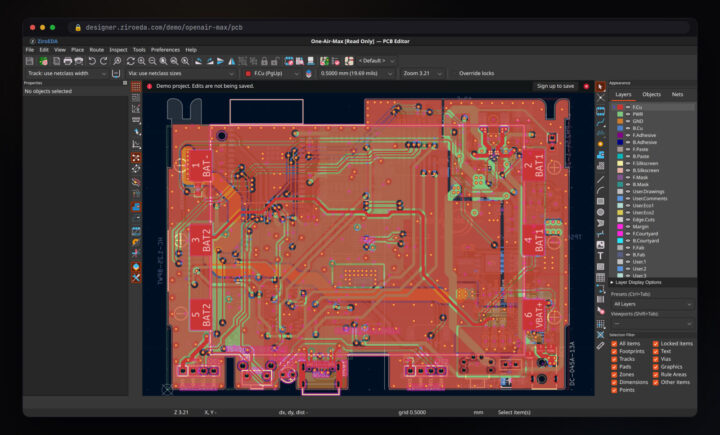
Two independent open-source projects, Ziro Designer/ZiroEDA and KiCad Android, now enable KiCad 10 to run unofficially in a web browser or as a native Android application. These developments expand KiCad's accessibility to platforms like RISC-V, Android tablets, and iPads, offering full schematic and PCB editing capabilities without requiring traditional desktop installation.
Key Highlights
- Ziro Designer/ZiroEDA allows KiCad 10.0.6 to run in a web browser, supporting local and GitHub-hosted projects.
- KiCad Android provides the full KiCad 10.99 EDA suite natively on Android tablets and foldables.
- Both projects were developed with assistance from Anthropic's Claude AI assistant.
- Ziro Designer supports schematic editor, PCB editor, interactive router, and ERC/DRC in a browser tab.
- KiCad Android features GPU acceleration (Vulkan), a built-in autorouter (Freerouting), a 3D viewer, and a built-in MCP server for AI interaction.
Technical Details
- Ziro Designer/ZiroEDA is a TypeScript translation of KiCad's C++ codebase, maintaining file-for-file parity with the original KiCad implementation to run core functionalities in a browser.
- KiCad Android is built from upstream KiCad sources, running natively on Android, utilizing KiCad's Vulkan backend for GPU acceleration and gl4es for 3D viewer support.
- KiCad Android bundles KiCad 10.0.8 symbol and footprint libraries and integrates Freerouting's engine for autorouting.
- The KiCad Android project includes a built-in MCP server that allows AI assistants like Claude Code to interact with and modify designs.
Implications
- KiCad becomes accessible on platforms previously unsupported, such as RISC-V devices, Android tablets, and iPads, broadening its user base.
- Users can access and work on KiCad projects directly from a web browser or Android device without needing to install the full desktop application.
- The ability to open GitHub-hosted projects directly in a web browser (Ziro Designer) streamlines collaborative design workflows.
- Integration with AI assistants (Claude AI) in both projects demonstrates potential for AI-augmented EDA workflows.
Limitations
- Both projects are unofficial and not affiliated with the main KiCad project, which may impact support or long-term maintenance.
- Ziro Designer is recommended for small and medium projects, with desktop KiCad advised for more complex designs, and it does not run on smartphones.
- KiCad Android experienced initial UI display issues on a smartphone, requiring manual adjustment of display and font settings for usability.
- Loading GitHub projects directly into KiCad Android required a workaround (manual download) due to unexpected credential requests for public repositories.
- KiCad Android is primarily designed for keyboard and mouse input, making touchscreen-only usage less user-friendly.
- KiCad Android is not yet available on Google Play, requiring manual APK installation.